1.3.2
No description yet. This curated deck is ready for daily study.
Card preview (24)
Database
An organized collection of data. Organizing data in a database allows for easy: - Adding/ modification/ deletion/searching
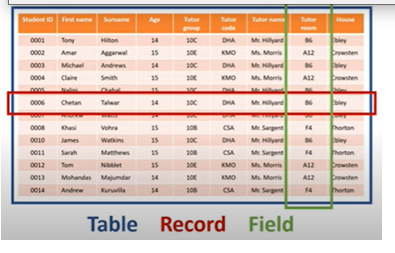
Tables
In a table: - The data is stored in a table (entity/file) - The table contains records (rows/tuples) - The table contains fields (columns/attributes)
Relational databases
A database needs an actual link to infer this logic, this link = relationship. An entity is an item of interest about which information is stored. A relational database is a database which recognises the differences between entities by creating different tables for each entity.
relational database adv and dis
Data is only stored once- No multiple record changes needed, More efficient storage, Simple to delete or modify details Better security. By splitting data into tables, certain tables can be made confidential. Avoids inconsistent records Easier to change data format Cost- quite expensive. there must be separate software which needs to be purchased. physical memory since it is with rows and columns. large organizations use more number of database systems with more tables. These information can be used to be transferred from one system to another. This could pose a risk of data loss.
Flat file
This database consists of a single file/table. It can be created very easily using either database/spreadsheet software and is often saved as a comma-separated value file (CSV).
Flat file adv and dis
• Very simple • Require little to set up • Suitable for storing small amounts of data • Take up unnecessary space • Be slow to query • Become difficult to maintain Harder to change data format. Potential duplication. As more and more records are added to the database it becomes difficult to avoid duplicate records.
Flat file uses
Typical uses: - Storing contact details - Small product database - Maintaining a game or music collection The flat file will most likely be based around a single entity and its attributes. Flat files are typically written out in the following way: Entity1(Attribute1, Attribute2, Attribute3 …)
1:1
1:1 One student has one planner, and one student planner belongs to one student.
1:M
1:M One tutor group contains many students, or many students belong to one tutor group.
M:M
M:M One student can be taught many teachers or one teacher can teach many students.
Primary key
This is a unique identifier for each record in the table. The primary key is shown by underlining it.
Why would a primary key not be a suitable
It is not unique
Foreign key
This is the attribute which links two tables together. The foreign key will exist in one table as the primary key and act as the foreign key in another. The foreign key is shown using an asterisk.
Indexes
Database automatically maintains an index of primary keys so that a specific primary key can be located quickly and easily. It provides a position of each record according to its primary key, makes it quicker.
Secondary key
It allows a database to be searched quickly. Therefore, a secondary index (secondary key) is set up on the surname attribute. This makes it possible to order and search by surname which makes it easier to find specific students in the database.
why would it be suitable secondary key
It is likely to be used to search for / index
Handling databases
Handling databases goes in four ways: - Capturing - Selecting - Managing - Exchanging
Capturing
Paper based forms. A large amount of data is still captured using paper-based data capture forms. Data input is mainly manual: human reading the from and typing the info into a computer-based system. To help reduce the chance of the person inputting the data incorrectly: - Every part of the form clearly labelled - Instruction to complete the form in a black pen - Instruction to complete form in capital letters - Use of tick boxes - Squares for entering each latter separately
Optical character recognition
CD Often used in post office and road cameras. To speed up + automate data input, we use OCR. It automatically reads text by interpreting the shape of the letters, works better with printed text than handwriting.
Optical mark recognition
CD Often used for multiple choice texts and lottery tickets. The fast and efficient way of collecting data and inputting it in a database while significantly reducing the possibility of human error.
Selecting data SQL
Once captured the info in a DB, we need an efficient way to retrieve it. Structured query language SQL allows for fast and efficient retrieval, selection and manipulation of data using a simple set of commands: SELECT/FROM/WHERE
Query by example
SD First graphical query language, making use of visual tables where the user would enter commands and conditions. Once a query is built using QBE, its converted into statements that can be executed against the database. By utilizing QBE, the user doesn’t have to remember the finer details of SQL syntax.
DBMS
MD Provide a layer of abstraction for the user and programmer. Hides the underlying structure of the data and ensures it remains integral by: - Preventing the creation of duplicate primary keys - Enforcing validation rules - Providing secure access - Providing encryption - Providing program data independence - Managing multiple users
Exchanging data
Last of all, we need to make sure we can exchange data between different databases/other systems/applications such as: - Spreadsheet software - Accounting programs To do this, we need to consider: Common formats used for exchanging data/ manual methods + of automatic exchange data exchange