Module 07: ArrayList
No description yet. This curated deck is ready for daily study.
Card preview (24)
7.1 ArrayList What is an ArrayList?
Mutable list of object references (A more convenient way to create adjustable arrays in through the ArrayList class)
7.1 ArrayList How does an ArrayList look like?
import java.util.ArrayList; ArrayList list = new ArrayList(); • Need import java.util.ArrayList; to use array list • E represents the data type that is used • declaration type must match the initialization type • Can only store objects, so must use the Integer and Double class • ArrayList () creates an empty ArrayList • Dont need to specify the length of the arrayList
7.1 ArrayList What is the difference between ArrayLists and Arrays?
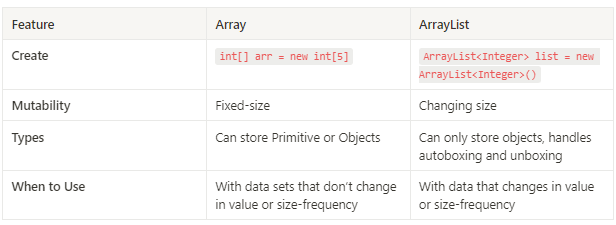
7.1 ArrayList How do you create an ArrayList of Strings? • String[] list = new String[]; • ArrayList list = new ArrayList(); • ArrayList list = new ArrayList; • List list = new List(); 5.
2. ArrayList list = new ArrayList();
7.1 ArrayList What is one of the primary differences between an ArrayList and an Array? • ArrayLists have a fixed number of values, while Arrays can change in size. • Arrays have a fixed number of values, while ArrayLists can change in size. • Arrays are only able to store objects, while ArrayLists can store primitive and object values. • ArrayLists are lists, while arrays are data structures.
• Arrays have a fixed number of values, while ArrayLists can change in size
7.1 ArrayList True or False: Attempting to add an int or double primitive value to an ArrayList will result in an error.
False When an int or double value is added to an ArrayList, it is automatically converted to its Wrapper class, and when it is accessed, is transformed back into its primitive value.
7.2 ArrayList Methods boolean add(E obj):
Appends obj to end of list arrrayList.add(”Add!”)
7.2 ArrayList Methods void add(int index, E obj):
Inserts obj at position index moves element index and higher up and adds 1 to size • arrayList.add(2, “Add”) • Increases index of higher values
7.2 ArrayList Methods E get(int index)
Returns element at the position index String elem = arrayList.get(2);
7.2 ArrayList Methods int size()
Returns the number of elements in the list int num = arrayList.size()
7.2 ArrayList Methods E set(int index, E obj)
Replace elements at index with obj. Returns replaced element arrayList.set(2, “NewValue”)
7.2 ArrayList Methods E remove(int index)
Removes an element from position index. Substracts 1 from size and moves elements index and higher down one index. arrayList.remove(2); • Decreases index of value index and higher • Can also return the value being removed
7.2 ArrayList Methods How do the features of arrays and ArrayLists compare?
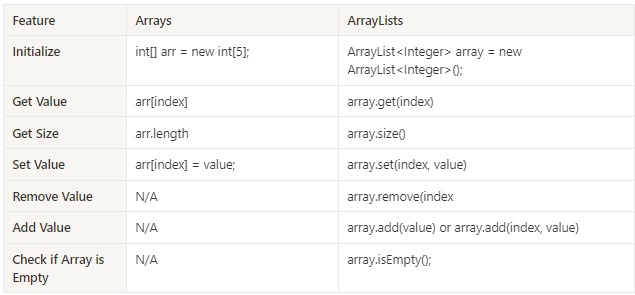
7.2 ArrayList Methods What value will be printed in the console after this series of commands? Assume that the ArrayList package has been imported. ArrayList array = new ArrayList(); array.add(3); array.add(9); array.add(10); array.remove(1); array.set(0, 3); int num = array.get(1); System.out.println(array.size()); • 1 • 2 • 3 • There will be an error caused by an incorrect use of ArrayList Methods.
• 2
7.2 ArrayList Methods What value will be printed in the console after this series of commands? Assume that the ArrayList package has been imported. ArrayList array = new ArrayList(); array.add(3); array.add(9); array.add(10); array.remove(1); array.set(0, 3); int num = array.get(1); System.out.println(num); • 3 • 9 • 10 • 2
• 10
7.2 ArrayList Methods What value will be printed in the console after this series of commands? Assume that the ArrayList package has been imported. ArrayList names = new ArrayList(); names.add(“Michael”); names.add(“Lebron”); names.add(“Serena”); names.add(“Shaq”); String firstName = names.remove(0); String secondName = names.set(0, “Venus”); names.add(2, firstName); System.out.println(“Names:” + secondName + “ and “ + names.get(1)); • Names: Lebron and Michael • Names: Venus and Serena • Names: Michael and Shaq • Names: Lebron and Serena • This will cause an error, as names.remove cannot be assigned to a value.
• Names: Lebron and Serena
7.3 Traversing ArrayList How do you traverse an ArrayList?
ArrayList scores = new ArrayLists(); for(int i = 0; i < scores.size(); i++) { //This prints out the ith element System.out.println(scores.get(i)); } • i iterates from 0 to size() • Each iteration of i accesses the index of scores at index i
7.3 Traversing ArrayList How do you traverse an ArrayList using a while loop?
int i = 0; while(i < scores.size()) { System.out.println(scores.get(i)); i ++; }
7.3 Traversing ArrayList How do you traverse an ArrayList using an enhance loop?
for(int score: scores) { System.out.printlnt(score); }
7.3 Traversing ArrayList How do you remove an element from the array?
public void removeA(ArrayList list) { for(int i = 0; i < list.size(); i++) { if(list.get(i).startsWith(“A”)) { list.remove(i); i–; } } }
7.3 Traversing ArrayList How do you remove elements from an ArrayList using a while loop?
int index = 0; while(index < list.size()) { if(list.get(index).startsWith(“A”)) { list.remove(index); } else { index++; } }
7.3 Traversing ArrayList Why should you not use enhanced for loops to remove elements from an ArrayList?
Trying to remove() with an enhanced for loop will often result in a ConcurrentModificationException Error occurs when objects are being modified while they are being iterated on Generally speaking, we should not iterate with enhanced for loops when adding or removing items
7.3 Traversing ArrayList True or False: Enhanced for loops should not be used to traverse ArrayLists.
False
7.3 Traversing ArrayList Will this method correctly traverse an ArrayList and remove all multiples of 3? public void remove3s(ArrayList array) { int counter = 0; while(counter < array.size()) { if(array.get(counter) %3 == 0) { array.remove(counter); counter++; } else { counter++; } } } • Yes, this method is written correctly, and will remove all multiples of 3 in an ArrayList. • No, this method is not written correctly, as the counter in the if statement will skip the next value, as the values will shift down in the ArrayList. • No, this method is not written correctly, as the counter in the else statement will skip the next value, as the values will shift down in the ArrayList. • No, this method will not work because the methods used to access the ArrayList are incorrect.
• No, this method is not written correctly, as the counter in the if statement will skip the next value, as the values will shift down in the ArrayList