Reliability Management
No description yet. This curated deck is ready for daily study.
Card preview (24)
Reliability manager
Responsible for atomicity and durability 2 of the ACID propertries. Implements these transactional commands: • begin transaction (B) • commit work (C) • rollback work (A, abort) Recovery primitives: • cold restart • warm restart (main memory failures) Interacts with buffer manager to ensure read/write requests’ reliability, and may generate more read/write requests for reliability purposes. It exploit log file: a log of the DBMS activity stored in stable memory. It prepares data for recovery by using: checkpoints and dumps.
ACID
Atomicity: changes on multiple data points are made as it was just one operation. -> either all changes are performed or none. Consistency: any change must be consistent with the rules (from constraints, triggers, cascades). I.E. to avoid to create money out of thin air (in banks) Isolation: every transaction is executed in a isolated and indipendent way. Durability: after the transaction is committed the changes endure.
Stable memory
Memory that is resistant to failure: • it does not exist in real life • approximated by robust write protocols and redundancy Failures in stable memory are THE END OF THE F*CKING WORLD (catastrophic).
Log file
Records transaction activities in chronological order. Two types of record: • transaction • system Writing: • records are written in current block in sequential order • records belonging to different transactions are interleaved
Undo/Redo
Undo Insert O -> delete O update O -> write the before state of O delete O -> write BS of O Redo insert O -> write AS of O update O -> write AS of O delete O -> delete O Idempotency property: Undo or Redo can be applied an arbitrary number of times without chaning the outcome. -> UNDO(UNDO(ACTION)) = UNDO(ACTION) REDO(REDO(REDO(REDO(A)))) = REDO(REDO(A))
Checkpoint
Operation periodically requested by Reliability manager to buffer manager. Duing checkpoint the dbms: writes data of committed and aborted transactions on disk (sync. write with force primitive) and records the set of active transactions. After this the chekpoint record is written (using force primitive) on log containing set of active transactions. After the checkpoint, all committed transactions are permanently stored on disk.
DUMP
It creates a complete copy of the state of the database: • performed (typically) when the system is offline • stored in stable memory (off-line) • copy may be incremental At the end of the dump, a dump record is written in the log file: • date and time of the dump • dump device used
Writing the log: rules
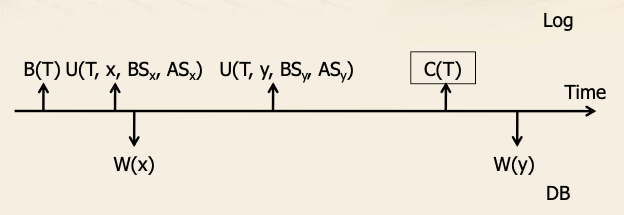
WAL: WRITE AHEAD LOG • Before state of data in log record is written in stable memory before database data is written on disk -> allows undo of data already written on disk Commit precedence • After state of data in log record is written in stable memory before commit -> allows redo operations for already committed transactions that haven’t been written on disk. In practice: • Sync (force) write for data modification on disk and on commit • The log is written in an async. way for abort and rollback. Commit record on the log is a milestone: • If not written in the log, upon failure the transaction should be undone. • If written, upon failure the transaction should be redone.
Writing the log guaranteeing properties
Usage of robust protocols to guarantee reliability is costly. It is require to guarantee the ACID properties. Log writing is optimized through: compact format, parallelism and commit of groups of transactions.
Protocols for writing log and database
• All data writes performed before commit • does not require redo of committed transactions • All data writes performed after commit • does not require undo of committed transactions • Disk writes take palce both before and after commit • requires both undo and redo operations • mixed approach adopted in real systems.
Types of failures
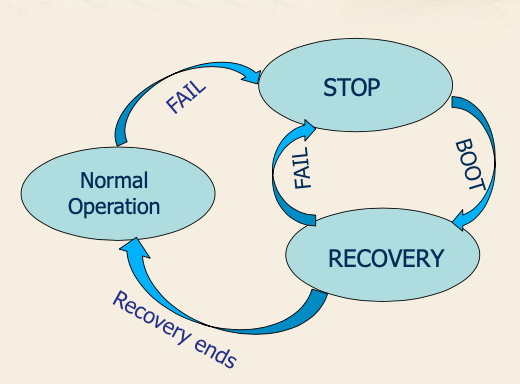
Part of recovery management System failure: • Caused by software problems or power supply interruptions • It causes losing the main memory content (buffer), not the disk (database and log) Media failure: • Caused by failure of devices managing secondary memory • It causes losing the database content on disk, but not the log content (stored in stable storage)
Fail-stop model and recovery
Failure -> system stop Recovery depends on failure type: • system faiulres -> warm restart • media failures -> cold restart When recovery end the systems becomes again available to perform transactions
Warm Restart, Transaction categories
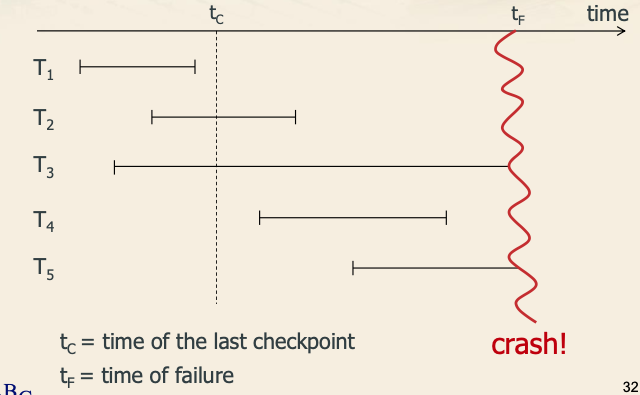
• Completed (t1) before checkpoint • no recovery needed • Committed (t2,4), but for which some writes on disk may not have been done yet • redo needed • Active (t3,5) transaction at the time of failure • they did not commit • undo is needed Checkpoint records is not really needed to enable recovery, but provedies faster warm restart. Without checkpoint record needs to be readh from last dump. Algo: • Read backwards the log until the last checkpoint • Detect transactions which should be undone/redone • At last checkpoint: insert in UNDO set all transactions for which the begin record is found. • Read forward log: insert into UNDO set all transaction for which begin record is found, and move transaction from undo to redo list when commit record is found • Transactions endind with rollback remain in UNDO set. • Data recovery • Log is read backwards from the time of failure until the beggining of the oldest transaction in the UNDO list • all actions from transaction in the undo list are undone • for each of these transaction the begin record is reached (even if earlier than checkpoint) • Log is read forward from the begiining of the oldest transaction in REDO list. • Actions of transactions in redo list are applied to database • starting point for each transaction is its begin record
Warm restart algorithm
Algo: • Read backwards the log until the last checkpoint • Detect transactions which should be undone/redone • At last checkpoint: insert in UNDO set all transactions for which the begin record is found. • Read forward log: insert into UNDO set all transaction for which begin record is found, and move transaction from undo to redo list when commit record is found • Transactions endind with rollback remain in UNDO set. • Data recovery • Log is read backwards from the time of failure until the beggining of the oldest transaction in the UNDO list • all actions from transaction in the undo list are undone • for each of these transaction the begin record is reached (even if earlier than checkpoint) • Log is read forward from the begiining of the oldest transaction in REDO list. • Actions of transactions in redo list are applied to database • starting point for each transaction is its begin record
Cold Restart
Manages failures demaging (a portion of) the database on disk Steps • Access the last dump to restore the damaged poriton of the disk • Starting from the last dump record, read the log forward and redo all actions on the database and transaction commit/abort • perform warm restart Alternative to 2 and 3 are: • Perform only actions of committed transactions • Requires two log reads • detect committed transactions • build redo list • redo actions of transactions in REDO list
Buffer manager and place within DBMS architecture
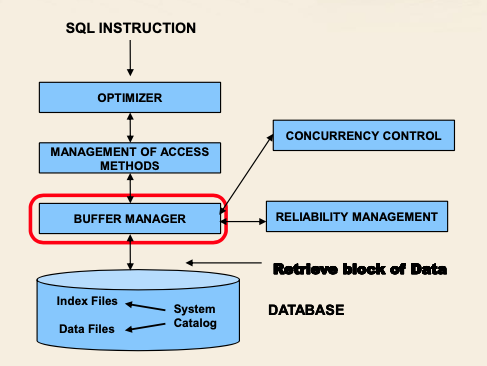
Manages page transfer from disk to main memory and vice versa. It is in charge of managing the DBMS buffer. Efficient buffer management is crucial for DBMS perfomance. Buffer: A large block of main memory pre-allocated to the DBMS, that is shared among executing transactions. Buffer organization: Memory is organized in pages, the size of a page depends on the size of the operating system I/O block.
Memory management strategies used by buffer manager
• Data locality • data referenced recelty is likely to be referenced again • Empirical law: 20-80 • 20% of data is read/written by 80% of transactions Buffer manager keeps additional snapshop information on the current content of the buffer. For each buffer page • Physical location of the page on disk (File ID, Block number) • State variables • Count: number of transactions using the page • Dirty Bit: which is set if the page has been modified Primitives to access/load pages from disk and v.c.: • fix • unfix • force • set dirty • flush The buffer manager requires shared access premission from the concurrency control manager.
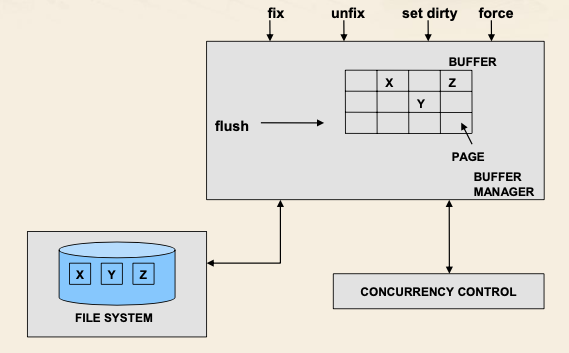
Buffer manger: fix primitive
Used by transactions to require access to disk: • page is loaed into the buffer • a pointer to a page int othe buffer is returned to requesting transaction. At the end of the fix primitive the requested page: • Is in the buffer • Is valid • The count state variable of the page is incremented by 1. The fix primitive requires an I/O operation only if the requeste page is not yet in the buffer, if it finds the requested already in the buffer, it returins to the requesting transaction the address of the page in the buffer (this, because of data locality, happens often enough). If the page is not inside the buffer, a lookup must reveal a page where the new page can be loaded, first among free pages, next among pages which are not free, but with count = 0 (called victing page, may still be locks, if the page has dirty=1, it is written synchronously on disk)
Buffer manager: unfix primitive
Tells the buffer manger that the transaction is not using the page anymore: state variable Count is decremented by 1.
Buffer manager: set dirty primitive
It tells the buffer manager that the page has been modified by the running transaction: dirty = 1
Buffer manager: force primitive
It requires a synchronous transfer of the page to disk: requesting transactions is stopped until the primitive ends. It always entails a disk write.
Buffer manager: flush primitive
It transfers pages to disk, independently of transaction requests: • It is internal to the buffer manager • It runs when the CPU is not fully loaded • It download pages which are • not valid (Count = 0) • not accesses since a longer time.
Buffer manager: writing strategies
• Steal • BM allowed to select a locked page with Count = 0 as a victim (page belongs to an active transaction) • Writes on disk dirty pages belonging to uncommitted transactions, that in case of failure must be undone. • No steal • BM not allowed to select locked pages • Force: all active pages of a transaction are synchronously written on disk by the buffer manager during the commit operation • No Force: pages are written on disk asynchronously by the buffer manager, using flush primitive. • Pages belonging to committed transactions may be written on disk after commit, in case of failure these changes must be redone. Typical strategy combines steal and no force, because of its efficiency: • No force provides better I/O performance • Steal may be mandatory for queries accessing a very large number of pages.
Buffer manager use of Filesystem
• Creation/deletion of file • open/close file • read: • direct access to a block in a file • requires file identifier, block number, buffer page where to loead data in memory. • Sequential read: • It provides a sequentail access to a fixed number of block in a file • Write and sequential write • Directory management