4.1.1 Networks Part 1 (B05)
No description yet. This curated deck is ready for daily study.
Card preview (24)
computer network
2 or more computers connected to each other to facilitate the transfer of data.
advantages of networks
ability to share hardware (printer, scanner) ability to work collaboratively by sharing access to the same files ability to communicate with colleagues using software software and storage can be shared across the network backups can be centralised (instead of individual backup for each user) security: ability to set shared antivirus software, approved software list
disadvantages of networks
introduces security vulnerabilities if network doesn’t have good policies/practices expensive (buy equipment, set up, manage, paying specialist staff) risk of users gaining access to information they don’t have permission to access ‘viruses’ can spread through connections
what is a client and a server
client requests data information and actions from the server. server responds to requests from the client
2 models of networks
client-server dedicated servers that are there to fufill the requests of the client peer to peer each device can be both client and server - all equal - no overall control. interchangeable
peer 2 peer adv and disadv
adv clients are not dependent on one single server doesn’t require expensive equipment to set up resources can be shared between computers (eg printers) torrenting getting small bits of files from lots of different computers in order to download the file faster (eg Netflix/streaming services) disadv shared peripherals can lead to a computer slowing down bcuz processing many requests if host computer breaks down this can cause files/peripherals that are hosted by it to be unavailable no central backup system no central way to provide security for the network
c-s adv and disadv
advantages: all files stored on the central server - can share access to them all peripherals are proccessed via the server - can print to any printer from any computer if a client machine breaks it won’t affect the whole network a backup can be taken of the server, easier than individual client machines can install software centrally disadvantages: if the server fails, how do you authenticate? - disrupts everyone connected to that server (mitigated by having multiple servers) require expensive equipment (the servers) need specialist network administrators
when would we use C-S vs P2P?
we use CS when a central server is required eg: a business needs employees to share files and software (which are stored and accessed via the central server) eg: gaming sites P2P to cut costs, reduce strain on main server
PAN
personal area network short term, limited, specific purpose, set up by the user, destroyed when the specific purpose has been fulfilled a person may connect laptop to smartphone to share internet access or a smartwatch…
LAN
local area network has multiple users, typically situated in a single bulding/room an small office may use a LAN
WAN
wide area network connects devices across a large geographical area often lots of LANs are connected together to create a WAN large businesses use WANs to share files/resources across multiple buildings/different offices - use fibreoptic cables sometimes
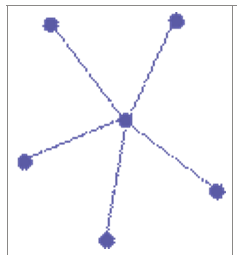
star topology description
has one central node with all of the other nodes connected to it. The central node would typically be a hub or a switch that could transfer data between nodes. If a hub is in the central node then it will broadcast the data to all nodes connected to it. If a switch is in the central node then it will transfer the data to the required location.
star topology adv disadv

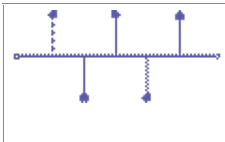
bus topology description
each node is connected to a single cable. When data is sent from one node to another it is sent in both directions. Terminators (hollow circle) are placed at the end of the cable to stop the signal being reflected back down the cable. The data is sent to all nodes connected to the bus. It is only accepted by the node that requires it.
bus topology adv disadv
Advantages ● A bus network is cheap because it uses minimal cables ● A bus network is simpler to set up than other arrangements ● It works well for very small networks Disadvantages ● If the main cable fails then the whole network fails ● It isn’t very secure because data is sent to all nodes on the network ● As more nodes are connected, the network performance reduces
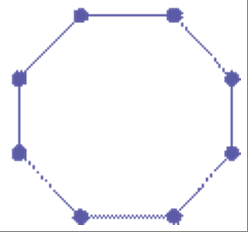
ring topology description
In this arrangement, each node is connected in a ring. When data is transferred it moves around the ring in one direction. The data will continue to move around the ring until it reaches its destination
ring topology adv disadv
Advantages ● It performs better than the bus topology when under heavy load ● Additional nodes have a minimal impact on the network performance ● There is less chance for data collision because the data moves in one direction, this makes data transmission quite fast Disadvantages ● There is a single point of failure — if there is a break in the loop then data cannot be transferred ● It isn’t very secure because all nodes can potentially see all of the data ● The whole network is as slow as the slowest link between any two nodes ● To add a new node, the whole network needs to be shutdown
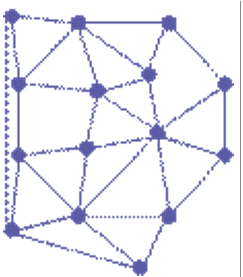
mesh topology description
In this arrangement, there are multiple ways for data to transfer from one node to another. Each node is connected to at least one other node. It is more common for them to be connected to more than one node. In a mesh network the most efficient route is typically calculated before transferring the required data.
mesh topology adv disadv
Advantages ● There is no central node, so there is no single point of failure ● The data uses the most direct route, making data transfer faster ● It works well under heavy load ● If a node breaks then a new route can be found for the data ● New nodes can be added without shutting down the network Disadvantages ● The increased cabling required for a wired network makes it expensive ● A wired mesh is far more complicated to manage and maintain than the other topologies
bandwith
measure of the maximum amount of data that can be transferred in a specific amount of time - often different for uploads and downloads - measured in Mbps
latency
delay from the time a signal is sent to when it is received - affected mainly by devices data travels through (and not much by distance travelled)
range
maximum reliable distance that the signal can travel before it degrades enough that the data becomes corrupted and the quality is lost
how does number of devices affect network performance
each device takes a share of the bandwidth available - with each new device, data transfer rate reduces
wired vs wireless transmission media (installation, flexibility, range, bandwidth, latency, reliability, security)
wired take longer to install - laying more cables wireless network more flexible/mobile - anyone with a wireless enabled device can access and move around without connection being lost wired has longer range (wifi has 100m theoretically but obstructed by physical objects) wired has greater bandwidth so is faster (on a wireless network bandwidth is shared by all active wireless devices) wired has low latency, wireless has high wired more reliable/consistent - less susceptible to interference wired more secure as data can only be accessed by devices that are physically connected - harder to eavesdrop. (wireless data needs to be encrypted)