1.1.3
No description yet. This curated deck is ready for daily study.
Card preview (14)
storage device
any computer hardware used for temporary or permanent storage of data. they can be internal or external to a computer.
internal and external examples
magnetic hard drive, ROM, RAM, internal solid state drive. DVDs, CDs, Blue-ray, USB pens, SD card, Portable solid state drive, Mass storage tape, cloud storage.
need for secondary storage
can retain contents when the computer’s power is turned off. This includes the Hard drive, optical media and solid state storage.
magnetic storage
Where metal disks called platters are magnetised. a read-write head moves very close to the platter and is able to detect and modify the magnetic properties of the platter. e.g. magnetic tape, floppy disks hard disk drives
magnetic storage advantages and disadvantages
high reliability; data can be retained over long periods of time. Offers greater capacity at a much lower unit cost than SSDs. Low cost per bit. fragile, if a magnetic disk drive is bumped or dropped, it can damage the disk inside. Bad portability, moving parts can become damaged when magnetic devices are transported.
Optical storage
data is written to the surface of a reflective disk using pits (depressions) and lands. A laser beam passes over the surface of a land and the light beam reflected back is interpreted as binary values. e.g. CDs, DVDs, Blue-ray disks
optical storage advantages and disadvantages
extremely light and portable, which is why they are used for distribution. relatively cheap, but only for lower storage capacities. Quite reliable. If you protect the reflective surface of the disc, they can last for a long time. If the surface of the disc is scratched, it can ruin the data stored on the disc. much lower capacity than hard drives or SSDs. slow seek time, means that the disc must spin to the right location before the data can be accessed. some CDs, DVDs, Blu-ray discs are not rewritable, so data can only be written to them once.
solid state
uses flash memory so data is read and written directly to blocks and pages on the silicon micro-chips. e.g. USB pens and SD cards
Solid state advantages and disadvantages
speed of access and portability, absence of moving parts means that mechanical failure is far less likely. reduced likelihood of damage through day-to-day bumps and knocks makes a solid-state device a better choice of drive for portable devices. lack of moving parts also reduces the amount of energy consumed, reduces amount of heat generated. can read and write data the quickest. limited lifespan. not suitable for the long term archiving of data. high costs.
RAM
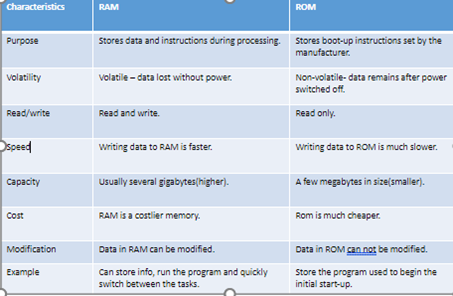
Random-Access Memory- a temporary storage of instructions and data and holds information being executed by the processor. Volatile because all the data in it gets erased after shutting down the computer and restarting it. Much faster than the hard disk. RAM is faster than ROM because writing data to a ROM chip is a slow process, whereas writing data to a RAM chip is a faster process.
ROM
Read-Only Memory- a small piece of read-only memory located on the motherboard. Because ROM is read-only, it cannot be changed; it is permanent and non-volatile, meaning it also holds its memory even when power is removed. Useful for storing fixed sequences of instructions like a computer’s startup (bootstrap) It can’t be accidentally I’ve written or deleted since it’s read-only It won’t need updating
difference between RAM and ROM
virtual storage
often referred to as cloud storage, it’s the concept of storing and retrieving data over the internet in the cloud instead of a local storage device.
virtual storage advantages and disadvantages
Data can be accessed any time Data can be accessed from any device (as long as there’s internet access). Data can easily be shared without the need for removable media transfer (e.g USB drive). Easily to collaborate. Storage considered to be limitless from the user’s point of view. Can become quite expensive. If connectivity is poor, access times can slow. No internet connection means no access to your files