Pandas Primer
No description yet. This curated deck is ready for daily study.
Card preview (24)
How do you read a comma-delimited file in pandas?
df = pd.read_csv(filepath)
How do you create a dataframe in pandas? (2)
• pd.DataFrame([[1, 2, 3], [4, 5, 6]], columns = [‘col1’, ‘col2’, ‘col3’]) • With a dictionary: • df = pd.DataFrame({“ID” : [1, 2, 3], “First Name” : [“John”, “Jim”, “Joe”], “Last Name” : [“Smith”, “Hendry”, “Wilson”]})
How do you show a dataframe in pandas?
display(df)
How do you access a cell in a dataframe?
• .loc[‘cobra’] • .iloc[row_or_col_index] • .loc[row_label,col_label] • .iloc[row_index,col_index]
What selection features does pandas support? (2)
• Slicing in .loc and .iloc with start_index:end_index • array indexing
What’s the difference between .loc and .iloc?
• loc is label-based, -> use row and column labels. • iloc is integer position-based -> use integer position values
how do you show the first few rows of a dataframe?
df.head(some_num_rows)
What’s one interesting thing about pandas slicing?
• When you want an entire row or column, instead of including a “:”, can omit the row or column index entirely (along with the comma) by not using a loc or iloc function at all • E.g. • display(df.loc[:, “Last Name”]) is equivalent to display(df[“Last Name”])
How do you set an entry in a DataFrame?
df.loc[1,”Last Name”] = “some_val”
How do you set a row in pandas?
df.loc[3,:] = (100, “Andrew”, “Moore”)
What happens if you try to set a row and the input index doesn’t exist?
new row is appeneded to the end
How do we select a subset of the rows that satisfy some conditions from a dataframe?
df[(df[“First Name”] == “Jim”) & (df[“Last Name”] == “Kilter”)]
Given this dataframe, how do you find rows where Last Name has 6 characters?
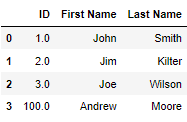
df[df[“Last Name”].str.len() == 6]
Given this dataframe, how do you find rows where First Name contains the substring “Jo”?
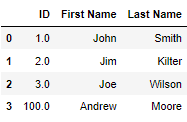
df[df[“First Name”].str.contains(“Jo”)]
Given this dataframe, how do you find rows where First Name is either “Jim” or “Kim”?
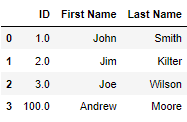
df[df[“First Name”].isin([“Jim”, “Kim”])]
What do you do if you want to find rows that do not satisfy a certain condition?
Use the negation symbol ~ E.g. df[~df[“First Name”].isin([“Jim”, “Kim”])]
• What’s one trick we can use to speed up the selecting of pandas rows? • What does it do?
• Use a query string to select rows, which • df.query(‘(First Name == “John”) & (Last Name == “Smith”)’) • can avoid the creation of the intermediate boolean index and reduce runtime / memory usage:
What’s important to remember about querying? (3)
• The returned object of a query is a view of the original data frame. • Modifying the view will not affect the original data frame, but will yield a warning. • Unlike Numpy, Pandas preserves the original row index after filtering. E.g. if you make a copy of a slice that has rows 2 and 5 and try to select index 1 from that, an error will be thrown.
How do you copy a dataframe?
.copy()
If our dataframe has no row with index 0, what do we do?
Call .reset_index(drop = True) E.g. df_copy_reset_index = df_copy.reset_index(drop = True)
How can we iterate over rows of a dataframe, from slowest to fastest?
• Use .iloc along with row index. • Use iterrows method. • Use apply with axis=1. • Fastest: Use Pandas vectorization
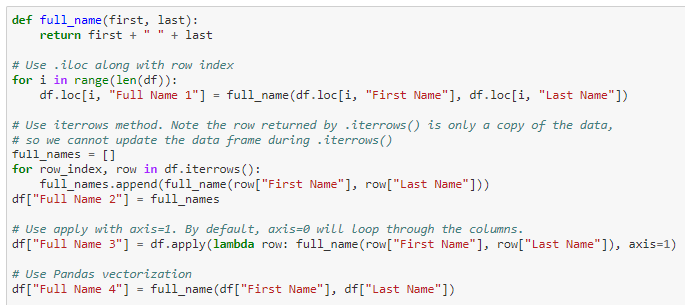
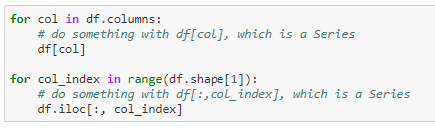
How can we iterate over columns of a dataframe? (iteration syntax and how you index the column)
• Call .columns to get the list of column names and iterate over it • Use .iloc along with the column indexes
What’s important to note about iterrows()?
• the row returned is only a copy of the data • so you cannot update the data frame during .iterrows()
What is the default of the apply method?
• To loop through the columns (same as axis=0) • To loop through rows, use axis=1