4.1.2 Networks Part 2
No description yet. This curated deck is ready for daily study.
Card preview (20)
internet
massive, global network network of networks
structure of the internet (4 main things)
internet backbone is the cables, fibre optic links and satellites connecting countries and continents to each other every device connected to the internet is part of a network: local networks connect to the internet via a point of presence (POP) provided by an internet service provider (ISP) - ISP’s network is connected to a high-level network owned by a major telecommunication company (eg BT in UK) - each of these companies has its own dedicated backbone network access points (NAPs) interconnect the internet backbones to form a worldwide mesh network routers forward data from one network to another across the internet from source to destination - keep each other up to date with traffic conditions, so data can be routed away from congested areas
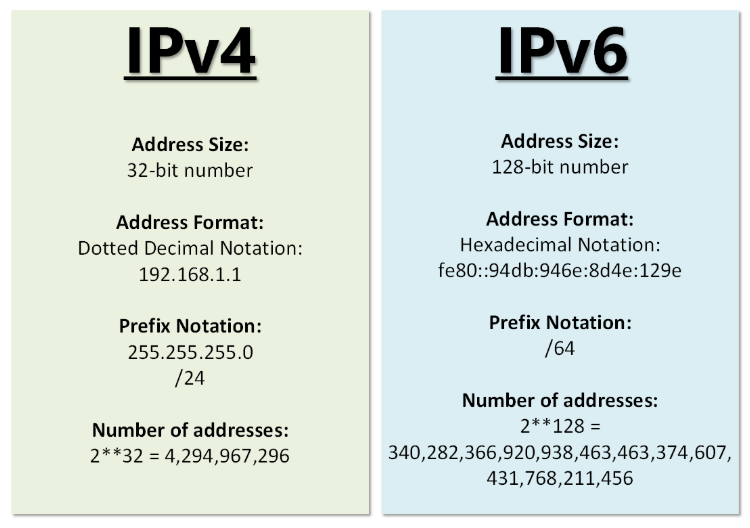
IP address (+ how many bits?)
unique address that every single device that connects to the internet needs IPv4 uses 32 bits in decimal - only allows 4B addresses IPv6 was introduced - uses 128 bits in hexadecimal
static vs dynamic IP address
devices requiring constant access to the network (routers, servers) are assigned a static IP address - never changes most devices have a dynamic IP address: - assigned to them by the network when they connect - returned to a communal address pool when no longer needed - allows multiple devices to share the limited number of IP addresses available on a network
DNS
domain name system used by the internet to enable people to enter words instead of numbers for IP addresses when you type X in to a browser, the browser uses DNS to look up the IP address assigned to the domain name
what are protocols and why are they needed
sets of rules governing transmission of data - need to be agreed for the internet to be scaled up for wider use for example: transmission speed, error checking, method of addressing
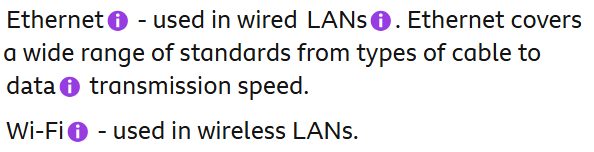
ethernet and wifi (as protocols)
TCP/IP (basic)
one of the suites of protocols used to transmit data over the internet TCP (transmission control protocol) breaks down data into small packet, distributes and reorders them at the destination IP is responsible for making sure data arrives at the correct destination
HTTP & HTTPS
HTTP hypertext transfer protocol - used to identify, request, transfer web pages across the internet HTTPS is a secure version of this protocol that adds in extra protection for the data that is transmitted (encrypts it)
FTP
file transfer protocol governs the transmission of files across a network and the internet
SMTP
simple mail transfer protocol governs the sending of an email over a network to a mail server
POP3 & IMAP
govern retrieving emails from email server POP (post office protocol) deletes the email after it is received by the computer IMAP (internet message access protocol) also leaves a copy the remote server, which is helpful if you want to view your emails on multiple devices POP has been largely replaced by IMAP
packet switching - basics
data is broken into small packets and sent across the internet using packet switching The recipient takes each packet, makes a note of its number and then puts it into the correct order a packet switched network can therefore be fault tolerant - if a particular connection fails, the packets can be sent via a different route and then reassembled in the correct order (this is possible even if some packets are delayed)
what does each packet consist of?
each packet consists of: header - includes source and destination IP addresses, the packet number (sequence number), the total number of packets, details of any protocols used, a checksum (error checking thing) payload - the information/message (also a footer - end of packet flag)
packet switching (when computer X wants to send data to computer Y across the internet…)
• X splits data into packets according to agreed protocols • packets are forwarded by a router on X’s network to the ISP • ISP’s router inspects the packet header to find destination address • router also uses a routing table to determine where to send the packet next (these last 2 steps will happen multiple times as the packet will be forwarded through multiple routers) • once a packet arrives at its destination the checksum formula is applied: if it does not match the one calculated at the source, the destination will request the packet to be resent from the source • packets from the same transmission may take different router and arrive out of sequence • so once all the packets have arrived at Y, it will use the same set of agreed protocol to reassemble them in the correct order
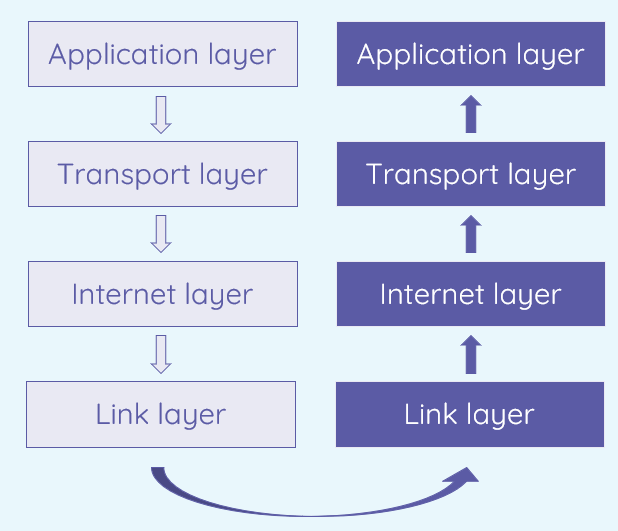
application layer (description + protocols)
defines how various user services operate (eg web browser, email) protocols: HTTP, HTTPS, FTP, SMTP, POP3/IMAP
transport layer (description + protocols)
establishes a dedicated channel between the source and destination devices to transfer the data along also determines how outgoing data is split up into packets and how incoming data is reassembled protocols: TCP delivers packet to specified recipient (+UDP)
internet/network layer (description + protocols)
adds the source and destination IP addresses to the data packets received from the transport layer and routes them to the recipient therefore uses IP
link/network interface layer (description + protocols)
defines how data is transferred from one device to another along the whole route from sender to recipient protocols: ethernet sets out data transmission on wired LANs, Wi-Fi for wireless LANs
encapsulation & decapsulation
As data moves down the layers it is encapsulated. Each layer ‘wraps up’ the data, along with the appropriate header before passing it onto the next layer. As data moves up the layers it is decapsulated. Each layer ‘unwraps’ the data after processing the instructions in the header.