3.1.1.2 BIOS, CPU, RAM & ROM (B01)
No description yet. This curated deck is ready for daily study.
Card preview (16)
volatile
needs power to preserve the data inside it
BIOS
is the set of instructions (also known as firmware) stored on a ROM chip that is used to start up the computer comes pre-installed on a personal computer’s system motherboard, and it is the first software to run when powered on
The instructions are copied from the ROM into RAM when ….
the computer is switched on
what does BIOS do
… starts up the monitor, keyboard and other devices. … checks all the components (e.g. hard disk drive) are working correctly. … instructs the computer to load the operating system into RAM. … hands over control to the operating system.
firmware
another name for the BIOS software
boot sequence
The boot sequence begins CPU starts up and fetches the BIOS from ROM Instructions from BIOS are loaded into RAM BIOS starts up the monitor and keyboard BIOS checks the computer’s components are working Operating system is fetched from secondary storage Operating system is loaded into RAM The BIOS hands control over to the operating system
what is memory
ability to store data using integrated circuits. It is known as primary storage. Data stored in memory is directly accessible to the CPU. is directly part of the motherboard’s circuitry.
writing and reading
writing- saving data to memory reading- retrieving data from memory
RAM
random access memory- all data held there is immediately available for access
why is memory/primary storage needed
A CPU needs to read/write data quickly. Reading/writing from secondary storage, e.g. a hard disc, takes a relatively long amount of time, with mechanical restrictions (e.g. how fast the disc can spin, how fast the arm can move), compared to reading/writing to memory (RAM).
why isnt all storage memory?
Cost: RAM is more expensive (per unit storage) than secondary storage. Memory is nearly always volatile, and thus not suitable for long-term storage.
main memory vs secondary storage (and egs of both)
MAIN MEMORY: fast, expensive, volatile (contents are lost when power is switched off; but ROM is non-volatile), directly accessible to the CPU. Examples: RAM, ROM, memory in the CPU: registers, cache. SECONDARY STORAGE: slow, cheap, non-volatile, not directly accessible to the CPU. Examples: hard drive, CD-ROM, USB drive.
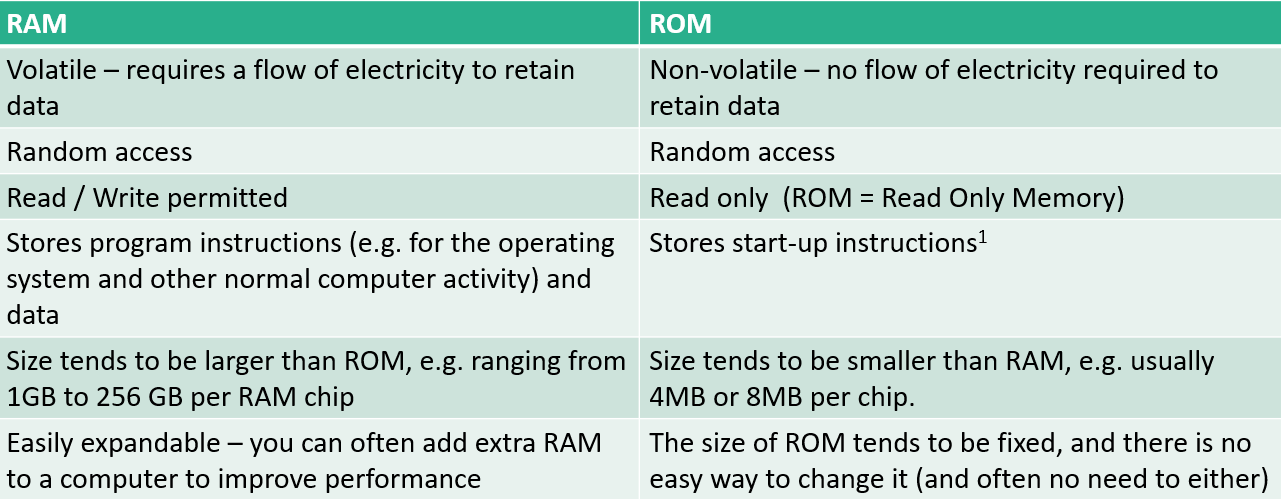
RAM vs ROM
CPU function
Executes program instructions Processes data However, its role is larger still: it also controls and coordinates the activities of the whole computer, include the parts involved in the input and output stages.
does all processing take place inside CPU
NO Processing can take place elsewhere inside a computer, though: e.g. the Graphics Processing Unit (e.g. on a graphics card inside your computer) will do a lot of the processing of data related to graphics. 3D graphics, for example, place heavy demands on a computer and having the GPU deal with it frees up the CPU for other processing activities.
virtual memory
temporarily transferring data from random access memory (RAM) to disk storage