Unit 3 Hardware And Software Pt. 1
No description yet. This curated deck is ready for daily study.
Card preview (24)
Logic Gates types
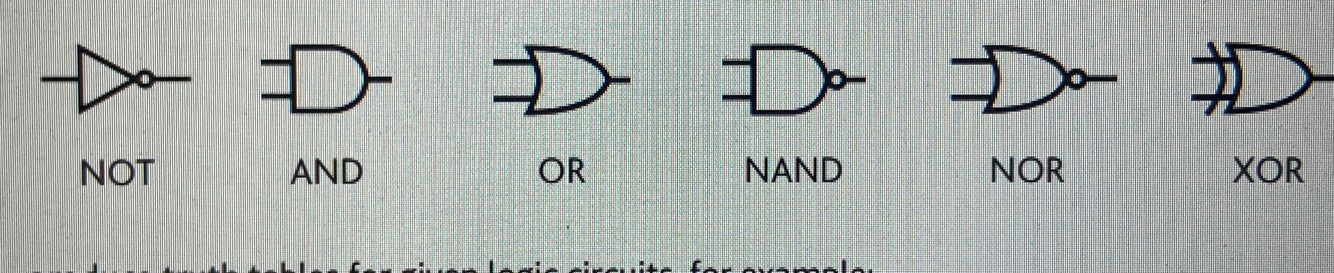
Describe truth table of NOT,AND,OR,NAND,NOR,XOR gates
Not- 1 input becomes 0 vice version And- Only 1 and 1 gives 1 output Or- Gives 1 when there is atleast 1 in inp Nand- Gives 1 every time except 1 and 1 Nor- Only gives 1 when input 0 and 0 Xor- Gives 1 when only 1 input is 1
What is the stored program concept
• Stores instructions, programs and data in the memory, - Instructions fetched and executed one after another one by one
Describe the fetch-execute cycle
• PC holds address of next instructions • Address held in PC sent to MAR via address bus • MAR goes to location in memory where instruction is stored • Instruction sent to MDR via data bus • Instruction then sent to CIR • Control unit sends signal to manage process using control bus • Value in PC incremented by 1 • Then instruction is decoded and executed
Describe buses in Von Neumann
Address bus- carries signal relating to addresses between the processor and the memory; unidirectional Data bus- can transfer data between the processes and memory and I/O devices; bi-directional Control bus- carries signals relating to the control coordination of the fetch-execute cycle ; uni and bi-directional Memory unit- Uses MAR and MDR, made up of partitions. Each has an address and contents. CPU only refers to main memory Main memory- IAS, RAM, holds data/instructions currently in use. Directly accessed by CPU, Volatile memory
Components of Von Neumann: ALU, ACC, PC, CIR, MAR, MDR
ALU - Arithmetic and Logic Unit, allows for arithmetic calculations and logic operations to be carried out ACC- Accumulator, register which acts as a temporary storage location for immediate result from the ALU and values from calculations PC- Program counter, register used by CPU to hold address of next instruction to be executed CIR- Current instruction register, holds instruction currently being executed or decoded MAR- Memory address register, holds memory location of data that needs to be accessed MDR- Memory data register, holds data content waiting to be written or read from location pointed by MAR
Interrupts and buffer
Interrupt: • To identify that the processor’s attention is required • To stop the current process • To allow multitasking • To allow for efficient processing • To allow for efficient use of hardware Buffer: -Region of memory used to temporarily store data while it’s being moved from one place to another Examples of interrupts: • Hardware issue, such as a printer paper jam • Key press by the user, e.g. CTRL ALT DEL • Software error
Describe how keyboard works
• Circuit board present at base of keys • When key is pressed that presses a switch • When pressed the circuit is complete • Location of key press is calculated • Each character has an ASCII value • Key press generates an interrupt
Describe how a 2D scanner works
• A light is shone on the surface of the document • Light source is automatically moved across the document • Reflected light captured by mirror and lenses. Used to scan sheets of paper
Describe how a 3D scanner works
• Works using laser or light source which is shone across the object • The width,height,depth of object measured • Model is replicated and created • Used to scan patient bodies, scan an object to create copies
Describe how a barcode reader works
-Input device Scanned using a barcode reader − Shines (red) laser/light − Light is reflected back, white lines reflect light, black lines reflect less light − Sensors/photoelectric cells detect the light − Different reflections give different binary values − Pattern is then converted to binary values − Microprocessor interprets the data Has to be bought separately But Quicker to scan than type, less human errors
Describe how a QR works
• Illuminator/Light shone on code • Black squares reflect different light to white • Corner squares used for alignment • Reflected light is focused on photosensitive cells or CCD • Pattern converted to digital data • Data sent to microprocessor
Describe how an interactive whiteboard works
• Output device • Fixed on walls • User can calibrate the device to make sure sensors align with projected image • Can use finger or pen to interact • Where touch is performed, location is calculated and output is shown
Describe how a microphone works
• Input device • Takes analogue sound and converts them into electrical signals • So computer can understand and process it
Types of sensors
Light- Detect light, street lights Temperature- detects temp, ovens Pressure- detects pressure, collision Magnetism- uses earth magnetic field Humidity/Moisture- used in greenhouses Acidity- pH of water, treatment of water Motion- detects motion, burglar alarm
How is a sensor and microprocessor used to control a thing
• Sensors take reading and data is sent to microprocessor • Analogue signal from sensor converted into digital using analogue to digital converter (ADC) • Microprocessor compares data against pre-set values • If matched no action taken • If not matched microprocessor sends signal and decreases or increases value accordingly • Process is continuous and repeated
Describe how an inkjet printer works
• Rollers used to move paper • Nozzles sprays liquid ink onto paper • Ink jet drops ink on paper • Different coloured inks mixed to create ideal color • May use thermal or piezoelectric tech -Prints high quality, cheap to buy, no warmup time, more expensive per per, ink could smear
Describe how a laser printer works
• Uses static electricity • Uses powdered ink • Rotating drum used to transfer image on paper • Has negative charge • Laser removed negative charge from areas and scans • Toner transfers from drum to positively charged paper -Prints high volume, cheaper cost per page, fast speed, expensive to buy, toner is expensive, has warm up time, heavy
Describe how a 3D printer works
• Uses a moving print head • Produces output using materials like plastic and resin • Uses layer upon layer of material to create output • Products can be customised but does have limitations to what can be made • Uses piezoelectric or thermal technology -Can create prototypes easily, prosthetic arms, dangerous objects could be created
Describe how a 3D cutter works
-Design is created on the computer / software / CAD -Material is loaded to cutter -Different types of material can be used -Uses lasers to cut material that use infra-red that produces extreme heat that is focussed using a special lens -Can work on both the x, y and z axis
Describe how a LCD works
− Liquid crystal display − The display is made of pixels arranged in a matrix − Uses a flat panel display − Backlit display with CCFLs/LEDs − Uses light-modulating properties of liquid crystals − Crystals can be turned between opaque and transparent (to allow light to pass) − Colours created using RGB − Not good at low temp as crystals can become solid − Low power consumption − Runs at cool temperature − Do not suffer image burn − Do not suffer flicker issues − Bright image/colours − High resolution image − Cheaper to purchase than e.g. LED screen
Describe how a LED works and its benefits
− Light emitting diodes (technology) − The display is made up of pixels that are arranged together as a matrix − Each is formed of three LEDs/filters − Shades of colour are achieved by mixing red, blue and green − The screen can be back-lit/edge-lit − Energy efficient // low power consumption − Long lasting // longevity − Focussed beam // less light strays from beam − Brighter/vivid colours − High resolution − No flicker − Display is thinner − Mercury free technology // environmentally friendly − Fewer pixel failure − Increased viewing in sunlight
Describe how a resistive touchscreen works
• Screen has 2 layers • Needs pressure to be applied to create a circuit, top layer is pressed • Calculation carried out where layers connect and output is produced accordingly • It’s cheaper but easily damaged • Used in GPS, printers, digital cameras
Describe how a capacitive touchscreen works
• Electrical field spread across the screen • Sensors located around the screen • When finger touches screen, the charge is transferred to the user as it is affected by conductivity of the human body • Coordinates of touch determination or calculated • Used in smartphones, iPads • Has multi-touch capabilities • Can’t be used wearing gloves