Chapter 4 (Pt. 2)
No description yet. This curated deck is ready for daily study.
Card preview (24)
How does black/white encoding differ from RGB?
Each pixel is encoded with either 0 (white) or 1 (black).
How is the greyscale encoded?
• 8 bits can be used to represent 256 different shades of gray • 0 (black) to 255 (white)
How are color images encoded?
16 colors (4 bits per pexl)… use a color palette 256 colors (8 bits per pixel) RGB True Color (Red Value, Green Value, Blue Value) • Typically 8 bits per color (total of 24 bits per pixel) • 16.7 million different colors.
Define: Vector Graphics
All components of the image are stored Can be easily scaled without losing image quality Common Vector Formats • Adobe Illustrator • CorelDRAW • MathML
Define: Data Compression Algorithms
Attempt to represent information in ways that preserve accuracy while using significanlty less space.
Define: Compression Ratio
Measures how much compression schemes reduce storage requirements of data.
Define: Run-length Encoding
Replaces a sequence of identical v1, v2,…,vn by a pair of values (v, n).
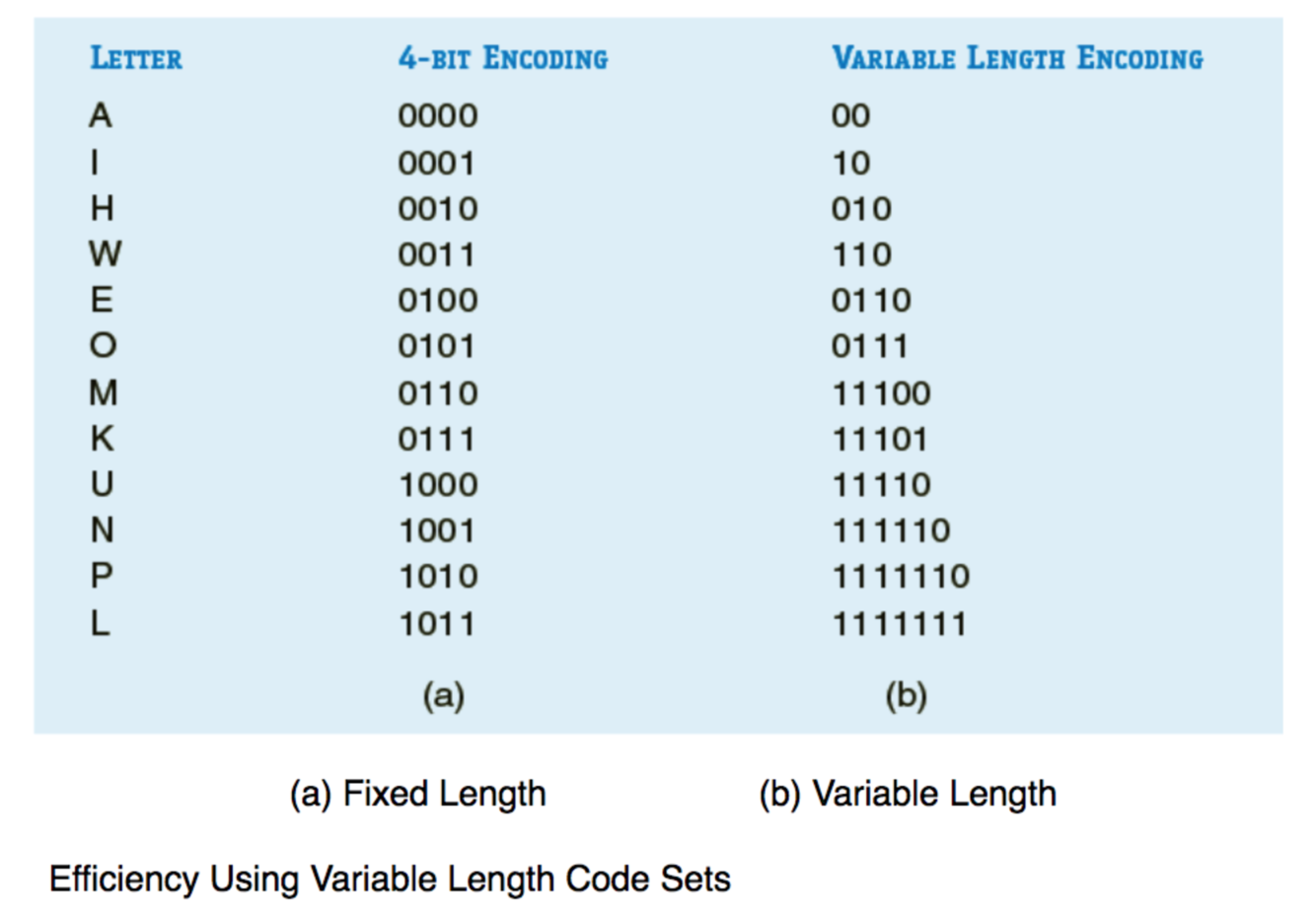
Define: Variable Length Code Sets
• Often used to compress text • More efficient • Can also be used with other forms of data.
Define: Lossless Compression Schemes
• No information is lost in the compression • It is possible to exactly reproduce the original data.
Define: Lossy Compression Schemes
• Do not gaurantee that all of the information in the original data can be fully and completely recreated • Trade image quality for file size
Which are the common Raster Image File Formats?
JPEG (Joint Photographic Experts Group) • 8 bit grayscale, 24 bit color • Compression is lossy TIFF (Tagged Image File Format) • 8 bit or 16 bits per color • Compression can be lossy or lossless GIF (Graphics Interchange Format) • 8 bit color palette • LZW lossless compression • Is now patent-free BMP • Uncompressed, large, lossless, simple structure PNG (Portable Network Graphics) • Free open-source alternative to GIF • 8 bit color palette, 24-bit truecolor, 48-bit true color • Compression is lossless • Patent-free replacement for GIF
Why is binary representation reliable?
Computers use binary representation for reasons of reliability. Building a base-10 “decimal computer” • Requires finding a device with 10 distinct and stable energy states that can be used to represent the 10 unique digits (0,1,….,9) of the decimal system. Bistable Environment • Only two (rather than 10) stable states separated by a huge energy barrier.
What is the universal storage medium?
• No practical universal storage medium exists • All forms of storage have drawbacks • Computer systems contain several kinds of storage
Describe the storage hierarchy.
Primary • Directly accesible to the CPU • Relatively expensive • RAM (volatile) … access time in nanoseconds • ROM (non-volatile) • Contains a small startup program (BIOS) • Reads a larger program from non-volatile secondary storage to RAM and start to execute it. Secondary • Not direclty acessible by the CPU • Relatively cheap • Non-volatile
What are the types of secondary storage mediums?
Hard disk drives … access time in milliseconds Rotating optical storage devices • Longer access times than hard disk drives • CD drive • DVD drive Flash Memory • USB Flash drives • SD cards • Memory Stick (Sony) Solid State Drives Hybrid Drives
Describe virtual memory
• As primary memory fills up, the least-used data is moved to secondary storage devices (swap file) • This data is retrieved when needed • More retreivals mean overall system performance is degraded
Describe offline storage
• Storage that can be physically removed or disconnected • Inreases general information security • Useful for archiving data
What are the seven characteristics of storage?
• Volatility • Mutability • Accessibility • Addressability • Capacity • Performance • Energy Use
Define: Non-volatile Memory
• Retain stored information without power • Suitable for long-term storage
Define: Volatile Memory
Requires constant power to maintain stored information Types • Dynamic Random-Access Memory (DRAM): requires stored information to be preriodically re-read and re-written (refresh) or it will be lost • Static Random-Access Memory (SRAM): does not need to be refreshed as long as power is applied.
Define: Mutable Storage
Read/Write Storage • Allows information to be overwritten at any time • Example: RAM, hard disk drives
Define: Immutable Storage
Read Only Storage • Retains information stored at the time of manufacture Write Once Storage • Allows information to be written only once at some point after manufacture • Example: CD-R
Define: Slow Write, Fast Read Storage (Mutability)
Allows information to be overwritten multiple times, but with the write operation being much slower than the read operation. • Example: CD-RW and Flash Memory
Define: Random Access
• Any location in storage can be accessed at any moment in approximately the same amount of time • Most semiconductor memories and disk drives provide random access.