Utility Software
No description yet. This curated deck is ready for daily study.
Card preview (15)
What are some examples of utility software?
Encryption Defragmentation Data compression Backup Disk clean-up
What does utility software do?
Helps in configuring and maintaining the computer or device
What does encryption software do?
Disguises the contents of files so they can only be understood by authorised users
How does encryption software work?
The software uses an algorithm to scramble the content so that it is unreadable
Why is defragmentation software needed?
When files are saved to a magnetic hard disk, they are stored in the next available space. This leads to files being split into fragments which takes longer to access as the drive head has to move more.
What does defragmentation software do?
Defragmentation software takes the fragmented files and rearranges the segments so that they run contiguosly.
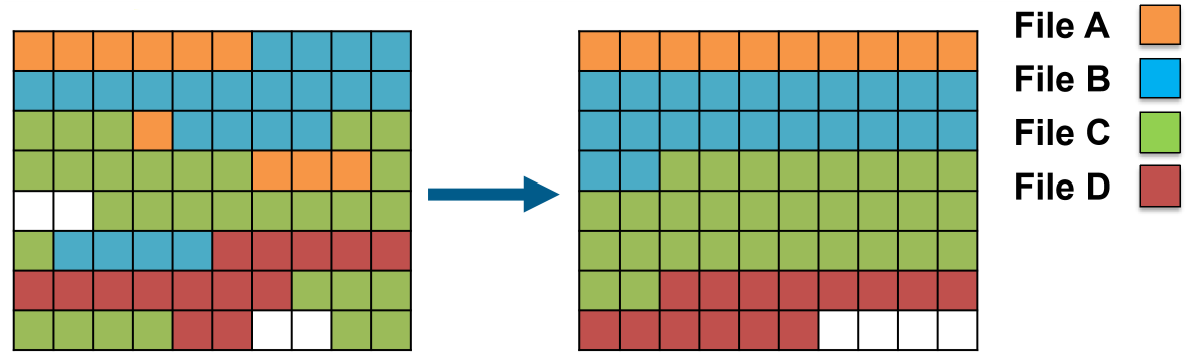
Why is defragmentation helpful?
It decreases the read/write time, therefore speeding up computer performance
What does compression software do?
Reduces the size of a file stored on secondary storage
Why can’t defragmentation be used on solid-state drives (SSDs)?
No performance benefit. No additional time cost in fetching pieces of data from different places Solid-state drives wear out. Writing to SSDs causes it to degrade slightly, unlike reading. So the more you write to an SSD, the shorter its lifespan will be.
Why does data need to be compressed?
Smaller files are easier to transmit across a network because they require fewer packets to be sent. A reduced size means that more files can be stored in a given area of storage
What happens if files are not backed up?
A user could accidentally delete/overwrite a file A hard disk could fail and prevent access to files stored on it A hacker could deliberately delete/overwrite data
What are the two types of backup?
Full backup Incremental backup
What is a full backup?
Involves making a copy of every file on the computer/network
What are the disadvantages of a full backup?
Require a lot of storage space Can be time consuming to make
What is an incremental backup?
Takes a copy of any new files created since the last backup, or any files that have been recently edited