Input Devices
No description yet. This curated deck is ready for daily study.
Card preview (24)
What is an input device?
Any device that allows you to pass information from the outside world into a computer system
How does a barcode scanner work?
It shines a red laser at a barcode to illuminate it. White lines reflect the light back, whereas the black lines absorb the light The strength of reflection is interpreted by a microprocessor and then converted into a binary value
When is a barcode scanner used?
Scanning goods at checkouts Checking library books in and out Tracking packages out for delivery
Why are barcode scanners needed?
Faster checkout queues Reduces errors caused by manual input More detailed tracking informaiton Automatic stock control
How does a digital camera work?
Light enters the camera and falls onto a sensor Each pixel in the sensor measures the light intensity A microprocessor converts these values into digital data that represents colour values
When is a digital camera used?
Integrated into most smartphones Proffesional photography Security and surveillance systems
Why are digital cameras needed?
Largely replaced traditional, film-based cameras Instant photographs (i.e. no development needed) Digital photos can easily be transmitted via WiFi, Bluetooth etc Embedded software can adjust photos
How does a keyboard work?
Each character on a keyboard has a corresponding character set value Key presses are converted into a digital signal; this is what the computer interprets
When is a keyboard used?
Built into laptops Connected to most desktop computers via USB/wireless Tablets and smartphones use virtual keyboards
Why is a keyboard needed?
One of the most common forms of text-based data input
How does a microphone work?
Vibrations caused by sound waves cause a coil to move around a magnet, resulting in electrical field changes These changes are converted by a microprocessor and an ADC into a digital representation of the sound
When is a microphone used?
Music recordings Dictation Radio, TV and films Online communication
Why is a microphone needed?
Captures any real-world sound and stores it as a digital approximation Digital sounds can be modified
Why does an optical mouse work?
Uses a red LED and a sensor to determine the movement of the mouse relative to the surface beneath A microprocessor analyses both the speed and distance of the movement and it replicates this on-screen via a virtual cursor
Why is an optical mouse used?
Navigation and interaction with almost all elements of a graphical user interface (GUI)
Why is an optical mouse needed?
Easy interaction with applications and other GUI elements More reliable as there are no moving parts, unlike mechanical mice No need for a special surface (i.e. mouse mat)
How does a QR code scanner workd?
Reads using a camera (usually from a mobile device) An app processes the image and converts the squares into readable data
When is a QR code used?
Advertising products Quick links to websites so don’t need to type in a URL Sharing contact details instantly
Why are QR codes needed?
Holds far more information than a traditional barcode Barcode holds: 30 digits QR code holds: 4296 characters (7089 digits)
How does a resistive touchscreen work?
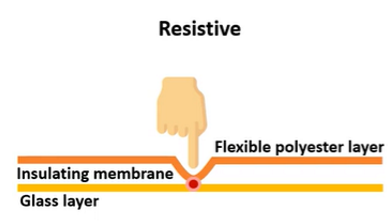
Consists of two conductive layers The two layers are separated by an insulating layer (gap/inert gas) When the screen is pressed, the two layers contact and complete the circuit
What are the advantages of a resistive touchscreen?
Cheap to produce Can be activated with any object (gloved finger, stylus etc) Very resistant to surface contaminants
What is a disadvantage of a resistive touchscreen?
Lower image clarity and precision compared to other types
How does a capacitive touchscreen work?
LEDs shine infrared light across a screen, forming a matrix When the screen is touched the beams are interrupted
How does a capacitive touchscreen work?
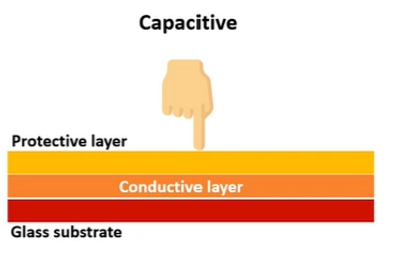
Composed of a protective layer, transparent conductive layer, glass substrate Touching the screen with a barefinger/stylus changes the electrostatic field of the conductive layer